Many creators already write their own songs in a notebook or on the phone. They do not want AI to rewrite them — they only want the song to sound right in an AI music app. Making own lyrics ready for AI music needs sections, a good style and a few singing fixes.
The “✍️ I have my lyrics” mode does that and keeps your words exactly as you wrote them.
- Your words are never changed — only arranged.
- Verse and chorus sections are added for you; a repeated chorus is written once.
- Three style options matched to the mood of your words.
How your words stay yours
The AI only tells the tool which of your lines belong to which section. The tool then rebuilds the song from your exact lines. If anything is missing, it falls back to simple sections — it never invents new lines.
Why it matters for Indian creators
India is one of the biggest music markets on YouTube, and most of its listeners search in Hindi, Bhojpuri, Punjabi and other regional languages. A creator who handles own lyrics ready for AI music well can reach people that big labels ignore — village weddings, festival playlists, devotional mornings and late-night sad songs.
In short: your words are never changed — only arranged.
Help the AI singer
Two switches change only the copy, not your saved lyrics: English letters (Roman) and easy-to-sing spellings for words AI singers often say wrong.
A singing check — only suggestions
If a line is much longer than the others, you see a gentle suggestion with Use this and Keep mine. The choice is always yours.
Common mistakes to avoid
- Skipping the pinned comment that asks for a favourite line.
- Copying lines from film songs — it can bring a claim or removal.
- Uploading many near-identical AI tracks in a row.
- Leaving the description empty instead of adding lyrics and credits.
Pro tips
- Keep the hook short and repeat it in the chorus — that is what people remember and search.
- Put the first line of the chorus in the description’s first two lines.
- Post the hook as a Short the day after the song.
- Use the same style line for a series so your channel has one sound.
A real example
Neha has written songs in a diary since college. She was afraid an AI tool would “improve” her words into something else. In “I have my lyrics” mode she pasted a song exactly as written. The tool only grouped her lines into verses and a chorus, offered three styles, and suggested shortening one long line — which she kept anyway. The upload pack listed “Lyrics by: Neha” and left out any tool credit. For the first time her own words were sung the way she heard them in her head.
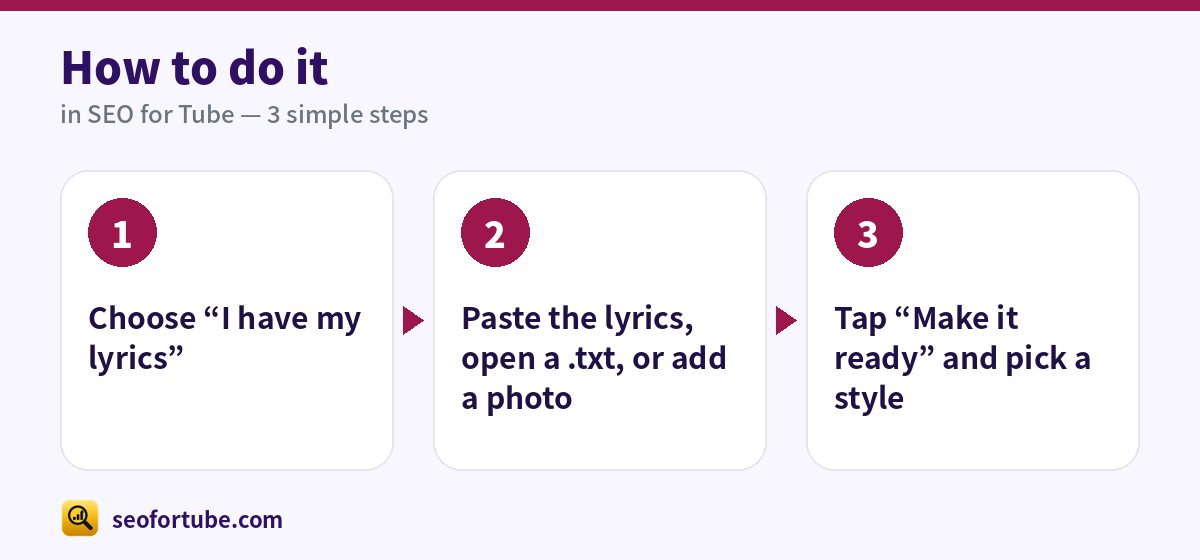
How to do it, step by step
- Choose “I have my lyrics”
- Paste the lyrics, open a .txt, or add a photo
- Tap “Make it ready” and pick a style
Frequently asked questions
Will the credits say my name?
Yes. In the upload pack, “Lyrics by” is your name, and the SEO for Tube line is off by default.
Are my lyrics shared?
No. They stay in your account and are not used to train AI.
What makes a song title searchable?
Song name first, then singer, then the type: Official Video, Lyrical or Audio — plus the language for regional songs.
Are lyric videos worth making?
Yes. Lyric videos are often searched more than the official video, and they are quick to make.
Summary
Have Your Own Lyrics? Make Them Ready for AI Music Apps Without Changing a Word: Your words are never changed — only arranged. Verse and chorus sections are added for you; a repeated chorus is written once. Three style options matched to the mood of your words.
Made for Indian creators — Hindi, Hinglish and every regional language, and easy on a phone.
Make my lyrics ready →