Suno and other AI music apps ask for three things in Custom mode: the lyrics, the style of music and a title. If one of them is weak, the song sounds generic. This guide shows how to make a song with Suno in a few taps.
Lyrics Writer gives you all three, already shaped for AI singers, with one copy button each and a character count so you know they fit.
- Three big buttons: Copy Lyrics, Copy Style, Copy Title.
- The style line names genre, instruments and voice — what AI singers need.
- A “Copy all” button for apps that want everything together.
The three boxes in Suno
- Lyrics — paste with [Verse] and [Chorus] tags kept.
- Style of Music — e.g. “Bhojpuri folk, dholak and flute, soft female voice”.
- Title — short and searchable.
Why it matters for Indian creators
AI music apps have made it possible for a single creator to release songs every week. The creators who grow are the ones who combine how to make a song with Suno with their own taste, their own voice and honest credits.
In short: three big buttons: Copy Lyrics, Copy Style, Copy Title.
Why tags matter
Section tags tell the AI where the hook comes back. Songs with a clear chorus are easier to remember, and remembered songs get searched — which helps your YouTube views later.
After the song is made
Download the song from the music app and come back to the result page. The YouTube upload pack below the lyrics gives you ranked titles, a description with the lyrics and credits, tags and hashtags.
Common mistakes to avoid
- One upload per song instead of a release plan.
- Tags in a mix of scripts that nobody searches.
- A thumbnail with a full sentence instead of 2–4 words.
- Skipping the pinned comment that asks for a favourite line.
Pro tips
- Save credits once in the tool so every upload is consistent.
- Group songs into playlists by mood or festival.
- Check the song in earphones before upload — AI voices sometimes slur words.
- Keep the hook short and repeat it in the chorus — that is what people remember and search.
A real example
Imran makes lo-fi Hindi tracks after work. His first AI songs sounded flat because he pasted only the lyrics. Once he added the style line from Lyrics Writer — “lofi Hindi, soft piano, rain sounds, calm male voice” — and kept the [Chorus] tags, the music app gave the hook a clear return. He now uses the character counts to keep the style short, saves the title for YouTube, and finishes a song from idea to upload in under an hour.
How to do it, step by step
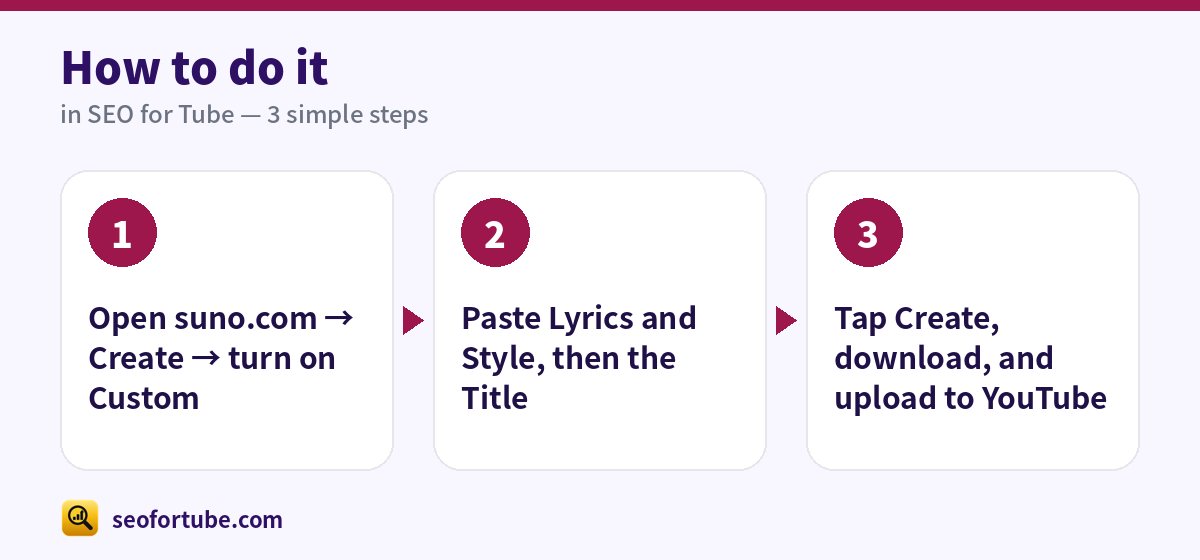
- Open suno.com → Create → turn on Custom
- Paste Lyrics and Style, then the Title
- Tap Create, download, and upload to YouTube
Frequently asked questions
Does this only work with Suno?
No. Any AI music app that takes lyrics and a style prompt works the same way.
Is my song monetizable?
Read our guide on AI songs and monetization — originality and disclosure matter.
Do I need a label to grow a music channel?
No. Many independent channels grow with consistent releases, clear credits and Shorts of the hook.
Can I use a famous song’s tune?
No — tunes and lyrics are protected. Make your own, or get permission for a cover.
Summary
How to Make a Song with Suno: Three big buttons: Copy Lyrics, Copy Style, Copy Title. The style line names genre, instruments and voice — what AI singers need. A “Copy all” button for apps that want everything together.
Made for Indian creators — Hindi, Hinglish and every regional language, and easy on a phone.
Make lyrics for Suno →