Making a song used to need a lyricist, a composer and a studio. Today an AI song lyrics generator can give you the words, and an AI music app can sing them. The hard part is getting lyrics that sound natural in your language and are ready to paste into the music app without fixing anything.
The new Lyrics Writer in SEO for Tube does exactly that. You write one line about your idea, pick a language, and in about 30 seconds you get full lyrics with verse and chorus tags, a music style prompt, a title and a ready YouTube upload pack.
- One line of idea → full lyrics, style and title in about 30 seconds.
- Works in Hindi, Hinglish, Bhojpuri, Bangla, Punjabi and any language you type.
- Copy buttons for Lyrics, Style and Title — made for Suno and other AI music apps.
What you get from one idea
- Lyrics with [Verse] and [Chorus] tags, so the AI singer knows where the hook is.
- Style — genre, instruments and voice in one short line.
- 3 title options and a 30-second Short clip idea.
- A YouTube upload pack: ranked titles, description with lyrics and credits, tags and hashtags.
Why it matters for Indian creators
India is one of the biggest music markets on YouTube, and most of its listeners search in Hindi, Bhojpuri, Punjabi and other regional languages. A creator who handles AI song lyrics generator well can reach people that big labels ignore — village weddings, festival playlists, devotional mornings and late-night sad songs.
In short: one line of idea → full lyrics, style and title in about 30 seconds.
Nine kinds of writing, not just songs
Pick what you want to make: a song, a devotional song for any faith, a spiritual talk, a poem, shayari, rap, ghazal, a kids rhyme or a jingle for a shop. Each one follows its own form — a ghazal gets proper shers, a kids rhyme stays simple and cheerful, and a jingle repeats your brand name.
Change only the part you do not like
Every section has small buttons: Catchier, More emotional, Simpler and New lines. They rewrite only that verse or chorus and they are free, so you can polish a song without starting again.
Original words, safe for YouTube
The lyrics are written fresh for your idea — not copied from film songs. If you paste lines that look like an existing song, the tool warns you, because YouTube can claim or remove videos that use someone else’s lyrics.
Common mistakes to avoid
- Copying lines from film songs — it can bring a claim or removal.
- Uploading many near-identical AI tracks in a row.
- Leaving the description empty instead of adding lyrics and credits.
- Using a real singer’s name or voice without permission.
Pro tips
- Put the first line of the chorus in the description’s first two lines.
- Post the hook as a Short the day after the song.
- Use the same style line for a series so your channel has one sound.
- Reply to comments with the next song’s name to build a habit.
A real example
Pooja runs a small channel of Hindi love songs from Lucknow. She used to spend two evenings on every song’s words. Now she writes one line — “waiting at the station for someone who never came” — picks Hindi and a soft acoustic mood, and gets a full song in half a minute. She keeps the chorus, taps “More emotional” on the second verse, and pastes everything into her music app. The time she saves goes into the video: real shots of an old railway station. Her songs now go up every week instead of once a month, and the lyrical versions bring steady search views.
How to do it, step by step
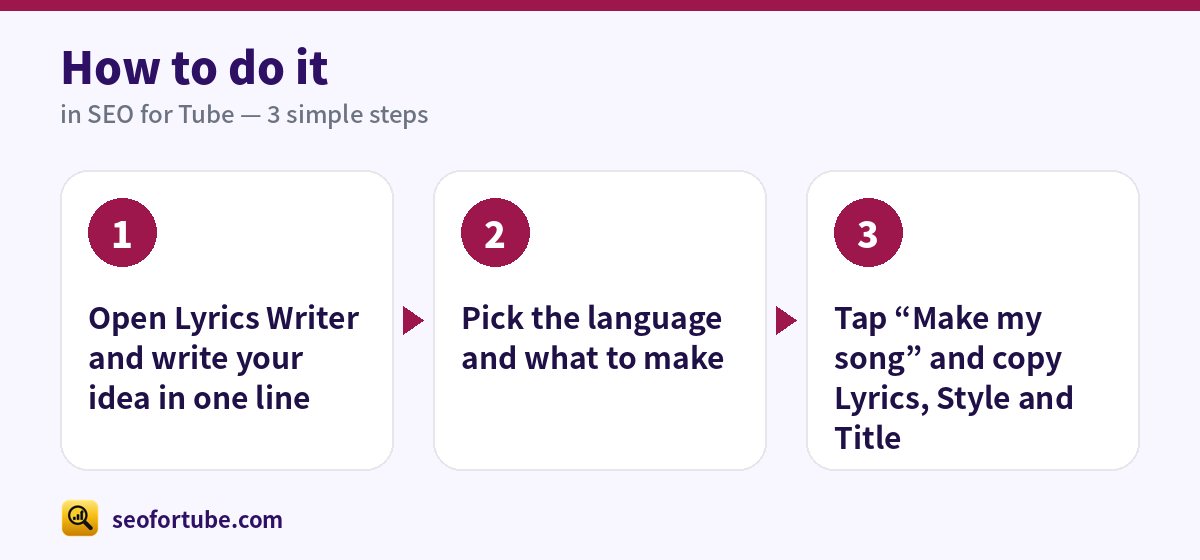
- Open Lyrics Writer and write your idea in one line
- Pick the language and what to make
- Tap “Make my song” and copy Lyrics, Style and Title
Frequently asked questions
Is the AI song lyrics generator free?
Each new song uses a small number of coins; rewriting one part and regenerating SEO pieces is free.
Can I write in Bhojpuri or Magahi?
Yes. Type any language — the lyrics are written in it, in its own script or in English letters.
Do I own the lyrics?
The lyrics are written for you and saved in your account. We do not share them or use them to train AI.
Can I upload a song made with an AI music app on YouTube?
Yes, if it is original, clearly different from your other uploads and honestly credited. Turn on the altered or synthetic label when the voice sounds real.
Should I put lyrics in the YouTube description?
Yes. Many people search a line of the song, and lyrics in the description help them find you.
Summary
Free AI Song Lyrics Generator for YouTube: One line of idea → full lyrics, style and title in about 30 seconds. Works in Hindi, Hinglish, Bhojpuri, Bangla, Punjabi and any language you type. Copy buttons for Lyrics, Style and Title — made for Suno and other AI music apps.
Made for Indian creators — Hindi, Hinglish and every regional language, and easy on a phone.
Open Lyrics Writer →