Students search chapter by chapter, and they search more as the exam comes closer. An education YouTube channel planner should follow the syllabus and the exam date — not random topics.
When your channel type is Education, the Video Planner shows the 📚 Syllabus Planner.
- Enter the exam, its date and the chapters (one per line).
- Chapters are spread until two weeks before the exam.
- Then: Important Questions, Previous Year Paper, Full Revision and Last-Minute Tips.
Why the last two weeks matter
Search for revision, important questions and PYQs jumps just before an exam. Having those videos ready on time is one of the easiest ways for a small education channel to grow.
Why it matters for Indian creators
Rules also differ. Kids, finance and health videos carry extra responsibility. Following education YouTube channel planner keeps viewers safe and protects your channel from strikes and limited ads.
In short: enter the exam, its date and the chapters (one per line).
Titles students search
Use the chapter name plus a format: One Shot, Important Questions, MCQ, PYQ. Never promise selection or “leaked” papers.
Common mistakes to avoid
- Promising results — profits, cures, exam selection.
- Skipping disclaimers on finance and health videos.
- Asking kids to comment on Made for Kids videos.
- Using long full clips from films or matches.
Pro tips
- Write the place, date or chapter in titles — specific titles win searches.
- Turn your best moment into a Short and link the full video.
- Keep a fixed upload day so viewers know when to come back.
- Run the Safety check for sensitive categories before every upload.
A real example
Meera teaches Class 10 Science in Hindi. She entered “Class 10 Science”, the board exam date and 13 chapters. The planner spread chapters until mid-January and kept the last two weeks for Important Questions, a solved previous year paper, full revision and last-minute tips. When search rose in February, all four revision videos were already live. Her channel grew more in those weeks than in the six months before.
How to do it, step by step
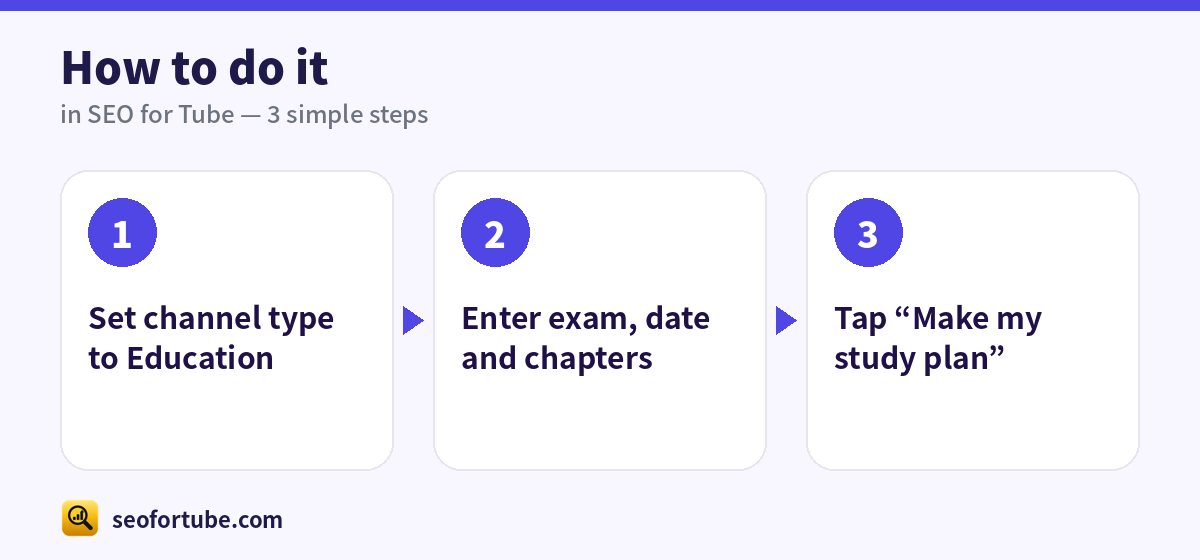
- Set channel type to Education
- Enter exam, date and chapters
- Tap “Make my study plan”
Frequently asked questions
Does it work for UPSC or SSC?
Yes — any exam with a date and a list of topics.
Can I change a date later?
Yes, open the video in the planner.
Can I use the Planner modes in Hindi?
Yes — every mode works in English, Hindi and Hinglish, including the names of the videos it creates.
What if my channel mixes two niches?
Pick the main one. If they are very different, consider a second channel — you can manage two in one account.
Summary
Syllabus Planner for Education Channels: Enter the exam, its date and the chapters (one per line). Chapters are spread until two weeks before the exam. Then: Important Questions, Previous Year Paper, Full Revision and Last-Minute Tips.
Made for Indian creators — Hindi, Hinglish and every regional language, and easy on a phone.
Open Syllabus Planner →